
Cordless barcode Scanner
Barcode Scanners give you the freedom to scan items around your store and then upload the details direct to the online shop to create your order.
Customers may be supplied a barcode scanner subject to terms & conditions.
If you are an existing customer and would like to be considered for a barcode scanner, please contact your local depot
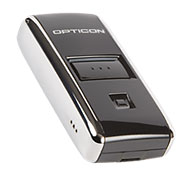
Opticon Barcode Scanner
The Opticon barcode scanner stores more than 10,000 barcodes at one time and has a 512Mb memory for application storage. Other features are scan and delete keys so any mistake can be corrected and a battery life on average of two years. The barcode scanner can be charged through a USB port. Once you have scanned items in your store, you can then upload the details direct to the online shop to create your order.
System Requirements
Microsoft Windows XP or higher with an active internet connection. Windows 8 users will need to switch to the Desktop to use this software.
Barcode Scanner Software Troubleshooting
- If the software doesn't detect your barcode scanner, try disconnecting it from your PC and then reconnecting it. Windows may install device drivers the first time and the software won't work until those are installed.
- Check that the green light on your scanner is illuminated when connected to your PC. If not, try plugging it in to a different USB port.
- If nothing happens when you press the large button on the scanner it may need charging. Plug it in to your PC for a while and try again.
- If the software is not working as expected, try disabling any security software (eg. anti-virus or firewall). If that works, re-enable your security software but make an exception for Bestway & Batleys Barcode Uploader.
- If you are experiencing any technical difficulties, or need assistance in setting up your account or scanning devices you can email to Technical Services Helpdesk or fill in our contact form.